WP Reset helps WordPress teams recover faster, test safer, and avoid rebuilding sites by hand after a bad plugin, theme, or database change. That matters because WordPress powers about 43% of all websites, so even small admin mistakes can affect a huge number of stores, blogs, and client sites.
TLDR: WP Reset is a WordPress recovery and development tool built around site resets, snapshots, plugin collections, and emergency access. For example, an agency testing five plugin stacks can reset a test site in under a minute instead of spending 20 to 30 minutes cleaning tables, options, and demo content manually. Snapshots help compare database changes before and after updates. Collections make repeated site setup less annoying by installing preferred plugins and themes in bulk.
What WP Reset Does
WP Reset is not a normal backup plugin. It is more like a site cleanup, rollback, and setup assistant for WordPress. It gives developers, agencies, and site owners a way to return a site to a safer state after testing themes, plugins, custom code, demo imports, or database edits.


The main idea is simple. WordPress sites often get messy during testing. Extra database tables remain. Plugin options stay behind. Demo pages pile up. Honestly, it feels like some plugins leave crumbs everywhere after removal. WP Reset gives users tools to clear those changes without deleting everything blindly.
Site Reset
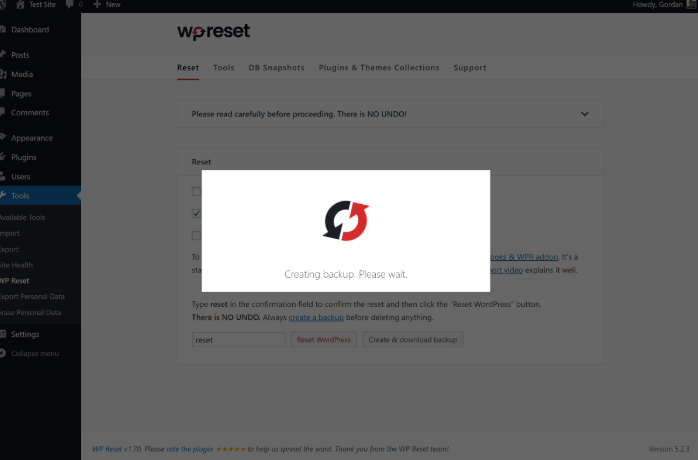
The Site Reset feature resets the WordPress database to a clean state while keeping core files, themes, plugins, and uploads intact. It removes posts, pages, comments, custom post types, users except the logged-in administrator, and many database settings.
This is useful for development sites, staging sites, demos, and training installs. A designer can test a theme demo, dislike it, reset the site, and try another setup without reinstalling WordPress from scratch.
Site Reset also supports post-reset actions. After the reset, WP Reset can reactivate selected plugins, reactivate the current theme, or reopen the WP Reset screen. That small detail saves time. It drives developers crazy when a reset works, but then they have to click through the same setup steps again and again.
Database Snapshots
Snapshots are one of WP Reset’s most useful features. A snapshot saves the current state of the WordPress database. If a plugin update breaks settings or adds unwanted tables, the user can compare or restore the previous state.
Snapshots are not full backups. They do not store uploaded images or site files. They focus on the database. That makes them quick and handy for testing, but they should not replace full off-site backups for live websites.
A common use case looks like this:
- A developer creates a snapshot before installing a new plugin.
- The plugin adds options, tables, or demo content.
- The developer checks what changed.
- If the result is poor, the snapshot is restored.
This is especially useful when testing page builders, security plugins, cache tools, and WooCommerce add-ons. These tools often write many options to the database.
Collections
Collections help users install groups of plugins and themes faster. Instead of searching for the same tools on every new project, an agency can create a collection with its preferred SEO plugin, form plugin, security plugin, cache plugin, and starter theme.
Collections can save real time across repeat builds. If a freelancer launches 10 client sites per month and saves 8 minutes per setup, that is more than an hour saved each month on basic installation work alone. The bigger win is consistency. Every starter site begins with the same trusted toolkit.
Selective Reset Tools
WP Reset includes several smaller reset tools for targeted cleanup. These are useful when a full reset would be too aggressive.
- Delete transients: Clears temporary cached database records.
- Clean uploads folder: Removes uploaded files when a test site has too much clutter.
- Delete themes: Removes unused themes in bulk.
- Delete plugins: Clears installed plugins quickly.
- Empty custom tables: Helps clean plugin-created tables when needed.
- Reset theme options: Useful when theme testing leaves bad settings behind.
These tools are powerful, so they should be used with care. On staging sites, they are great. On live sites, users should create a full backup first. One wrong click can remove content that someone spent hours preparing.
Emergency Recovery Script
The Emergency Recovery Script is designed for ugly situations. If wp-admin stops working after a bad plugin update or a broken theme change, this script can help restore access.
It can disable plugins, switch themes, restore user privileges, and fix some common access problems. This is valuable when the dashboard is unreachable and normal admin tools are useless.
The catch is that it must be prepared before disaster strikes. If a site owner waits until the login screen is already broken, setup may be harder. Agencies often keep this ready on client sites because panic tickets rarely arrive at a convenient time.
Cloud Storage and Remote Snapshots
WP Reset also supports cloud storage for snapshots and collections in paid versions. This helps users keep recovery points away from the local site. If the site database is damaged, having data stored elsewhere is safer than keeping everything inside the same WordPress install.
Remote storage also helps teams. A developer can create a standard collection, store it remotely, and reuse it across multiple projects. That makes setup cleaner and less dependent on one person’s local machine.
WP Reset for Agencies and Developers
WP Reset is strongest on development, staging, testing, training, and demo sites. Agencies can use it to create repeatable workflows. Plugin makers can test uninstall routines. Theme shops can reset demos between customer previews. Course creators can clean training sites after student exercises.
It is less suited as the only safety tool for production sites. A live store, membership site, or news site needs full backups, file backups, database backups, and a proper restore plan. WP Reset can still help, but it should be part of a larger maintenance process.
Key Benefits
- Faster testing: Sites can be cleaned and reused quickly.
- Cleaner databases: Old settings, tables, and content can be removed.
- Safer experiments: Snapshots reduce risk before updates or plugin tests.
- Repeatable setup: Collections help teams install standard tools faster.
- Emergency access: Recovery tools can help when wp-admin breaks.
Limitations to Keep in Mind
WP Reset should not be treated as a full backup system. Snapshots are database-focused. They do not replace full backups that include uploads, themes, plugins, and media files.
Users should also be careful with live sites. A reset tool is supposed to delete data. That is its job. Before using major reset actions, a full backup should exist, and the user should know exactly what will be removed.
FAQ
Is WP Reset safe to use?
WP Reset is safe when used correctly, especially on staging and development sites. On live sites, users should create a full backup before running reset or cleanup tools.
Does WP Reset delete images?
A standard site reset does not delete uploaded media files. Some selective tools can clean the uploads folder, so users should read each action carefully before confirming it.
Are snapshots the same as backups?
No. Snapshots mainly store the database state. They are useful for quick rollback during testing, but they do not replace full site backups.
Who should use WP Reset?
Developers, agencies, plugin testers, theme designers, and WordPress educators benefit the most. It is also useful for site owners who often test plugins on staging sites.
Can WP Reset fix a broken admin area?
Its Emergency Recovery Script can help in many cases. It may disable bad plugins, switch themes, or restore access. It works best when prepared before the problem occurs.
What is the best WP Reset feature?
For most teams, Snapshots are the standout feature. They make testing less risky and help users recover from bad changes quickly.